You’ll get accurate readings by first acclimating your thermometer for 15–30 minutes and cleaning the lens with a soft cloth. Power on the device, select the appropriate mode (Body, Object, or Surface), and confirm your temperature unit. Hold it perpendicular to your target, 3–5 cm away, and press the trigger for 1–5 seconds. Guarantee a clear line of sight, avoid drafts and direct sunlight, and capture multiple measurements for reliability. Calibrate every six months using black body sources. Understanding emissivity settings and environmental factors will elevate your measurement precision considerably.
Getting Your Thermometer Ready
Before you measure anything with your infrared thermometer, you’ll need to prepare it properly to guarantee accurate readings. Start by allowing the device to acclimate to ambient temperature for 15 to 30 minutes, ensuring stable internal components. Next, perform lens cleaning using only manufacturer-approved materials and methods, gently wiping away dust or smudges with a soft cloth. Inspect the lens and sensor area for scratches or obstructions that could impair infrared signal detection. Check that your environment maintains stable temperature conditions, avoiding extreme fluctuations that compromise accuracy. Store your thermometer in a protective case when not in use. If condensation forms on the lens, allow it to dry completely at room temperature before proceeding with calibration techniques or measurements. Additionally, remember that infrared thermometers primarily measure surface temperatures and don’t directly measure air temperature, so keep this in mind when taking readings.
Powering On and Selecting Modes
Once your infrared thermometer is properly acclimated and cleaned, you’re ready to power it on and configure the measurement settings. Press the designated power button or trigger to activate the device. Some models automatically power off after 10 seconds of inactivity to conserve battery, so you may need to reactivate it for each measurement.
Next, use the mode selection tips by accessing the Mode button to toggle between measurement options: Body, Object, Surface, or Room temperature. The display shows an icon indicating your current mode. If your thermometer includes child/adult settings, select the appropriate option via the designated switch or buttons.
Confirm the temperature unit displayed—Celsius or Fahrenheit—using the dedicated unit button. Cycling through settings guarantees you’ve configured all parameters correctly before taking readings.

【Highly Accurate & Adjusts to Any Surface】Designed with the latest thermopile sensor technology, the infrared laser thermometer gun is accurate to +/-1.5%; Improve this pizza oven thermometer gun measurements by adjusting the emissivity from 0.1–1.0 to match the surface material being measured
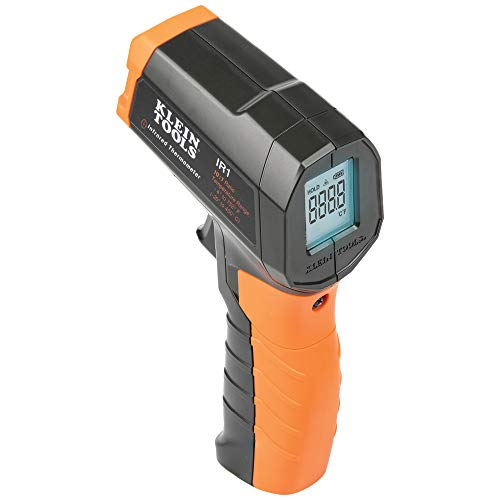
PRECISE TEMPERATURE MEASUREMENT: Optical resolution (distance-to-spot) of 10:1 ensures accurate temperature readings from a distance

【Dual-Mode Infrared Thermometer Gun】Switch between non-contact laser temperature gun measurement (-58°F to 1472°F) and K-type thermocouple probe contact mode (-58°F to 572°F). Ideal for HVAC, automotive repair, industrial maintenance, and cooking applications.
Mastering the Measurement Technique
Now that you’ve configured your thermometer’s settings, proper measurement technique becomes critical to obtaining accurate temperature readings. Hold the device perpendicular to your target surface, maintaining the recommended distance specified in your manual. Press and hold the trigger steadily for 1-5 seconds, allowing the sensor adequate time to detect stable temperatures. This deliberate approach guarantees measurement precision across repeated assessments.
For reading reliability, capture multiple measurements rather than relying on single readings. Document variations to identify anomalies. Keep your line of sight unobstructed and your target clean and dry. Allow sufficient time for thermal equilibrium between the thermometer and environment when changing between locations. These systematic practices eliminate variables that compromise accuracy and establish consistent, dependable temperature data for your applications. Additionally, be aware that ambient temperature changes can significantly influence the accuracy of readings. Understanding the limitations related to infrared thermometers will also enhance your overall usage experience.

PRECISE TEMPERATURE MEASUREMENT: Infrared Thermometer (Cat. No. IR1) with a 10:1 optical resolution ensures accurate temperature readings from a distance

Temperature measurement range:-50℃-500℃ (-58℉-932℉)Display resolution: 0.1 ℃ or 0.1 ℉

【CAL Function for Stable Reading】 Features exclusive one-button calibration technology to maintain measurement consistency for objects over time, effectively countering the reading drift often seen in standard thermometers. Our advanced sensor delivers dependable data for your projects.
Creating the Right Environment
While your measurement technique forms the foundation of accurate readings, the environment surrounding both your thermometer and target considerably influences the data you collect. You’ll achieve ideal measurement accuracy by positioning yourself away from drafts, direct sunlight, and sudden temperature fluctuations. Allow your thermometer 15–30 minutes to acclimate when moving between extreme environmental conditions, as thermal shock to the lens can introduce errors up to 5–6°F. It is important to recognize that infrared thermometers only measure surface temperature and cannot assess internal temperatures. Maintain clear line of sight between your device and target, avoiding steam, smoke, and particulate matter that scatter infrared signals. Keep your IR lens clean in dusty or steamy environments. Position your measurement station deeper inside buildings to minimize outdoor air infiltration effects on environmental conditions and guarantee consistent, reliable results. Infrared thermometers are particularly advantageous in non-contact temperature measurement as they provide immediate readings without the need for physical interaction with the surface being measured.
Ensuring Accurate Readings
Because environmental conditions alone don’t secure reliable results, you’ll need to implement systematic calibration and positioning protocols to guarantee your infrared thermometer performs within established accuracy standards. Start by calibrating your device using black body sources, which provide laboratory-grade accuracy within ±0.3°C per ASTM E1965 standards. Position your thermometer 3–5 cm from the measurement target, respecting the manufacturer’s distance-to-spot ratio specifications. Understanding your device’s distance-to-spot ratio is crucial to maintaining accuracy in various conditions. Adjust emissivity settings to match your target’s surface properties—reflective surfaces require lower emissivity values than non-reflective ones. Apply calibration methods every six months to maintain measurement reliability. Additionally, consider how the use of infrared thermometers in cooking can improve the precision of cooking techniques by ensuring proper temperature management. These systematic steps eliminate guesswork and provide consistent, dependable temperature readings across varying conditions.

𝐕𝐞𝐫𝐬𝐚𝐭𝐢𝐥𝐞 𝐓𝐨𝐨𝐥𝐬: Infrared technology allows you to measure various objects at home and outdoors; Use it for 𝒎𝒆𝒂𝒕, 𝑫𝑰𝒀 𝒄𝒂𝒏𝒅𝒚, 𝒐𝒗𝒆𝒏𝒔, 𝒈𝒓𝒊𝒍𝒍𝒊𝒏𝒈, 𝒇𝒐𝒐𝒅, 𝒄𝒐𝒐𝒌𝒊𝒏𝒈, 𝒂𝒖𝒕𝒐𝒎𝒐𝒕𝒊𝒗𝒆 𝒖𝒔𝒆, 𝑨/𝑪, 𝒓𝒆𝒇𝒓𝒊𝒈𝒆𝒓𝒂𝒕𝒐𝒓𝒔, etc.
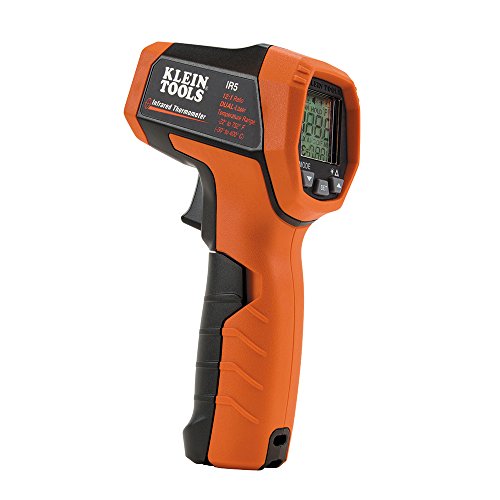
PRECISE TEMPERATURE MEASUREMENT: Optical Resolution (Distance-to-spot) of 12:1 ensures accurate temperature readings from a distance

𝐖𝐢𝐝𝐞 𝐓𝐞𝐦𝐩𝐞𝐫𝐚𝐭𝐮𝐫𝐞 𝐑𝐚𝐧𝐠𝐞: Measure a temperature range from -58°–1130°𝙁 / -50°–610°𝘾 𝙖𝙣𝙙 𝙜𝙚𝙩 𝙮𝙤𝙪𝙧 𝙧𝙚𝙨𝙪𝙡𝙩 𝙞𝙣 0.5 𝙨𝙚𝙘𝙤𝙣𝙙𝙨; The display will also show the max temperature of the surface you’re measuring. Perfect heat gun for measuring.
Understanding Device Features
Once you’ve established your calibration and positioning protocols, you’ll want to familiarize yourself with the specific features your infrared thermometer offers, as each component directly impacts how you’ll operate the device and interpret its results.
Your thermometer’s laser pointer enables precise targeting, while its distance to spot ratio determines measurement accuracy at varying distances. The temperature range specifies which applications you can measure. Emissivity adjustment compensates for different surface properties, enhancing precision. For example, having the correct emissivity setting can significantly improve the accuracy of your readings for different food surfaces.
Understanding your sensor type and response time helps you anticipate measurement speed and reliability. Explore measurement modes—min/max, average, difference—for thorough data analysis. Alarm settings notify you when temperatures exceed thresholds. Finally, evaluate ruggedness and durability for your work environment, and verify your power source provides adequate runtime for extended field use.

【LIGHTNING-FAST & ACCURATE】Get instant readings in just 0.5s with ±1% accuracy. The 12:1 distance-to-spot ratio lets this laser temperature gun safely measure hot surfaces from 14 inches away—no need to get close to heat or danger.

【Ultimate Versatility for Kitchen, Garage & House】Ideal for a multitude of tasks! Check pizza oven or griddle heat for perfect cooking, monitor HVAC system vents, or safely diagnose automotive repair issues like overheating engine parts, all with our infrared thermometer gun

Adjustable Emissivity 0.1-0.99 for All Materials: Built-in customizable emissivity from 0.1 to 0.99 (default 0.95), matched with full material emissivity reference chart, delivers accurate readings for metal, wood, plastic, food, ice and more polished/shiny surfaces.
Maintenance and Care Tips
Just as calibration guarantees measurement accuracy, proper maintenance and care preserve your infrared thermometer’s performance and longevity. You’ll maintain peak functionality through systematic cleaning procedures and regular calibration checks.
For cleaning procedures, you’ll use a soft cloth or cotton swab dampened with water or medical alcohol. Gently wipe the lens first, then the body. Never submerge the device or use harsh chemicals. Allow components to air-dry completely before storage or use.
You’ll implement routine cleaning every six months, though contaminated environments require cleaning after each use. Store your thermometer in a cool, dry location between 40°F and 149°F, protecting it from extreme temperatures and direct sunlight. Use a protective case to shield the lens from dust.
Regular calibration checks verify accuracy. Follow manufacturer instructions for calibration procedures, as frequency depends on your usage patterns and environmental conditions.
Troubleshooting Common Issues
Even with meticulous maintenance and calibration, you’ll occasionally encounter issues that affect your infrared thermometer’s performance. Error messages or flashing symbols typically indicate operational problems requiring manual consultation for model-specific solutions. Red backlighting or beeps often signal ambient temperature extremes outside your device’s operational range.
Start troubleshooting by removing the batteries for approximately 60 seconds, then reinstall them to reset firmware glitches. If display issues persist, inspect the sensor lens for dirt, cracks, or damage that compromises readings. Infrared thermometers are safe when used according to manufacturer instructions and proper handling guides.
Calibration issues frequently stem from incorrect emissivity settings or environmental instability. Verify you’re using proper emissivity values around 0.98 for common surfaces. Allow your thermometer and calibration equipment to acclimate for at least one hour in a stable environment, as proper alignment is crucial for accurate measurements.
When self-troubleshooting fails, contact manufacturer support or pursue warranty service options for persistent malfunctions.

PRECISION MEASUREMENTS FOR COOKING: Know how hot your cooking surfaces are before you start cooking. Good for pizza ovens, griddles, ovens, pans and more. The digital infrared thermometer gun for cooking offers an emissivity range from 0.1 to 1.0, ensuring precise temperature readings across diverse surfaces and conditions. For optimal accuracy, maintain a 14-inch distance from the target object with the temperature thermal gun.

🎁【High Accuracy】 DESOMIYE laser thermometer gun adopts the latest high-sensitivity temperature sensor, which can measure the temperature range of -50°C~600°C (-58°F~1112°F) in only 0.5 seconds. For best results, the reader should be 14 inches away from the object.

【2-in-1 Infrared & Probe Thermometer】Perfect for home chefs, grilling enthusiasts and DIY hobbyists who demand professional control; Use the IR sensor for safely checking pan, oven, or grill surface temps, and the meat probe for perfectly cooked meats, candy, or frying oil
Storage and Battery Management
Because proper storage and battery management directly influence your infrared thermometer’s longevity and measurement accuracy, you’ll want to establish systematic practices that protect both the device and its power source. Store your thermometer between 68°F and 77°F in a cool, dry location away from humidity and temperature fluctuations. Use a protective case to shield it from dust and mechanical damage. For battery replacement, install recommended battery types promptly when low voltage warnings appear, ensuring correct polarity alignment. Remove batteries during extended storage periods to prevent corrosion and leakage. Clean battery contacts with a dry cloth to maintain proper electrical connection. Before critical measurements, verify battery level and allow the device fifteen to twenty minutes to reach room temperature, stabilizing internal components for peak sensor performance.